設定
設定
 迅速な配送
迅速な配送
 送料は無料
送料は無料
 Incoterms
 お支払い方法


 マーケットプレイス製品


メーカー品番 NUCLEO-F042K6
NUCLEO-32 STM32F042K6 EVAL BRD
STMicroelectronics

Microcontrollers Arduino ARM mbed
Debugging via printf (or Serial.print or snprintf) can be an extremely useful tool for seeing, quickly, what your system is doing and to zero in on the parts of your system that are, or could soon be, causing errors. This tool is not without its downsides, however, and you may have found in your experimentation with printf that including it even once takes up a significant amount of memory in your final program binary. This challenge limits the times you can use printf/snprintf IRL, despite how useful it can be. In this article, we'll do our best to make printf/snprintf smaller so you can fit it into tinier systems.
We’ll focus specifically on program size when comparing optimizations below, though I’ll make mention of RAM size and whether a certain implementation uses the heap, where appropriate.
How much bigger does printf make our code? Let's test! A simple test will be to compile our program both with and without a call to printf and then compare the resulting code sizes. We’ll use the version of printf that appeared at the end of “Faster printf Debugging, Part 1” as our baseline (which used the LL library inside __io_putchar, set the processor clock speed to 48 MHz, and set the baud rate to 3 Mbaud).
printf("Value of counter: %03d\n", (int)counter);

//printf("Value of counter: %03d\n", (int)counter);

For the Nucleo-F042K6 I’ve been using in STM32CubeIDE, we can see that using this printf implementation results in an additional 4.23 kB (10.84 – 6.61 kB) of code!
What's taking up all that code space? The plethora of data types, flags, and options that printf/snprintf supports, of course! Do you know what gets emitted when a float is given to "%+-5.1f", or when an integer is given to "% -5d" (notice the space after the percent sign)? printf does. Making printf/snprintf smaller requires finding alternative implementations that eschew some of those options, or that keep those options but are, instead, optimized for small code size.
But that's not the only place where our FLASH memory gets used up! All of those debug message strings are stored in FLASH, too, and the memory they use adds up quickly. It would only take 32 messages of 32 bytes each to take up 1 KB of memory! The code sizes above include just a single 23- or 24-character string, so any practical usage of printf/snprintf would result in larger code sizes, commensurate with how many different message strings were in your binary. We can further limit how much memory our debugging system takes by simply reducing the number and length of our debug messages.
Let's talk about a few ways to implement these solutions. But first, a note about which optimizations were already on, implicitly, during our test above.
newlib-nano is a version of the C standard library that’s been optimized for small systems, like microcontrollers. STM32CubeIDE enables this version by default, which is excellent because switching to “Standard C” in the project options adds nearly 25 kB of code (preventing my application from even fitting on my Nucleo-F042K6 with only 32 kB of Flash space)!
This isn’t the only C library that boasts small code size, though. Others to consider include Segger’s emRun/emRun++ and Embedded Artistry’s libc.
Normally, the linker will not discard any code sections (even if your program never uses them!) unless instructed to do so, which is done by adding the flag -Wl,--gc-section. (Turning this off adds 27.4 kB to our baseline code!) Additionally, we can instruct the compiler to put each function and piece of data into their own sections with the flags -ffunction-sections and -fdata-sections. This allows the linker to have finer granularity when it decides which “sections” to keep or discard.
Applications that use function pointers, however, may find this technique untenable, unfortunately. Functions that are only called through function pointers may look to the linker like they’re never called, which might incorrectly remove them from the final executable.
The STM32 LL library essentially wraps simple register reads/writes, while the HAL provides more features, such as a higher-level API, error-checking of input parameters, etc. This, naturally, makes it larger than using the LL library. Compare the two functions, below, that both transmit data over the UART port:
 __STATIC_INLINE void LL_USART_TransmitData8(USART_TypeDef *USARTx, uint8_t Value)
{
 USARTx->TDR = Value;
}
.HAL_StatusTypeDef HAL_UART_Transmit(UART_HandleTypeDef *huart, const uint8_t *pData, uint16_t Size, uint32_t Timeout)
{
  const uint8_t  *pdata8bits;
  const uint16_t *pdata16bits;
  uint32_t tickstart;

  /* Check that a Tx process is not already ongoing */
  if (huart->gState == HAL_UART_STATE_READY)
  {
    if ((pData == NULL) || (Size == 0U))
    {
      return  HAL_ERROR;
    }

  // continues for another 90 lines of code...

}
Using the HAL for just this little example would have increased our code size by 17.63 kB (28.47 – 10.84 kB)!!

Of course, that number would have been even worse if we’d included more HAL modules or HAL function calls in our code, as well.
Using floating-point numbers, in general, would add a lot of code. This is primarily because the STM32 processor I’m using has no floating-point hardware, so any floating-point math being done has to use a (large) software library. Additionally, printf itself gets larger when we ask it to handle floating-point numbers because, surprise, surprise, it’s harder to convert a float into a series of ASCII characters than it is an integer. In fact, using the floating-point version of printf would have added 17.13 kb to our code!!
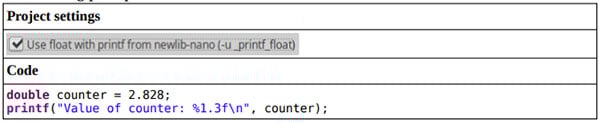



So, it’s probably best to try to avoid floats entirely. One way to do this is to simply think of your decimals as merely integer versions of smaller units, such as an integer number of millivolts rather than a decimal number of volts. There’s not much difference in uint32_t millivolts = 1204 and float volts = 1.204, after all (except what it does to your code size!).
If you need the precision that decimal values offer, a second option is to use fixed-point numbers instead of floating-point numbers. A fixed-point number is a binary number whose decimal point (or, rather, “binary point”) has been moved from the right of the number to somewhere in the middle. For example, 0110 1101 would normally represent the number 10910, but that’s only because we assume the binary point is to the right of the number, so we interpret 0110 1101 as 26 + 25 + 23 + 22 + 20. If the binary point were in the middle, however, then we would read 0110 1101 as 22 + 21 + 2-1 + 2-2 + 2-4 or 6.812510. Fixed-point numbers are stored and operated on just like integers*, so you can avoid all of the floating-point libraries if you use them in your code, as opposed to using floats or doubles. One downside, though, is that printf doesn’t have a type specifier for “fixed-point”, so you’ll need to be a little creative in how you actually print those values. Here are some ideas:
Ex: printf(“Value is %d V\n”, volts));
// Prints “Value is 109 V” with the value above, but 109 / 16 = 6.8125.
Ex1: printf(“Value is %d and %d/16 V\n”, volts>>4, volts&0xF));
// Prints “Value is 6 and 15/16 V” with the value above
Ex2: printf(“Value is %d.%d V\n”, volts>>4, (volts&0xF)*625));
// Prints “Value is 6.8125 V” with the value above (the magic number “625” is 10000/16, which converts the lower four bits of our fixed-point number from 0-15 into the range 0-9375, representing the decimal portion)
More accurately, addition and subtraction with fixed-point numbers work exactly the same as for integers.
Multiplication and division also work, but you’ll need to move the binary point after each operation. For example, multiplying 3.812510 (which we’ll assume has 4 integer bits and 4 fractional bits, like 6.812510, above; this is called Q4.4 format) by itself would result in a 16-bit number with 8 integer bits and 8 fractional bits (Q8.8 format). The result, 0000 1110 1000 10012 or 14.5351562510, isn’t larger than 15.937510 (the largest unsigned value we can represent with Q4.4), but to put that number back into Q4.4 we need to right-shift the result by 4 and also mask off the upper 4 bits, resulting in 1110 1000 (which also rounds the result to 14.510).
These operations are easy to put into a small header file (see this appnote for more). For more complex operations, I’d suggest finding a fixed-point library, such as fr_math or the CMSIS DSP library (which supports fixed-point numbers).
Although USB did end up being much faster than UART, the code needed to manage a USB connection was large. In fact, it wouldn’t even fit on my Nucleo-F042K6 without turning up the optimization level.
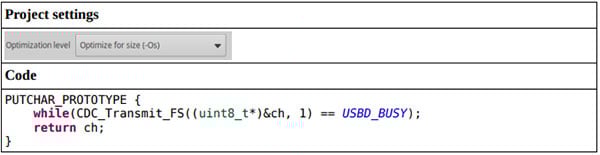

In the next section, we’ll see that our baseline printf example with an optimization level of -Os compiles to a Flash size of 7.7 kB. This would indicate that the USB library adds 10.87 kB of code to our project. In practice, my projects were about 12.2 kB larger than their UART counterparts; possibly this is because using USB required slightly more complicated code to manage the double-buffering than UART did.
The USB library provided by ST (USB_DEVICE) also increased RAM usage by about 4 kB (nearly exceeding our available RAM space!), and it likely uses the heap.
Our first real optimization is an easy one: compile with -Os! Instead of optimizing for speed, which -O3 would do, -Os optimizes for size. Adding this to our printf implementation reduces our baseline code size by 3.14 kb (10.84 – 7.7 kB).

(Interestingly, this has no effect on the actual printf function, because it sits in a pre-compiled library, newlib-nano. But it does have a nice effect on the rest of our code.)
For whatever reason, in my testing I’ve discovered that snprintf is smaller than printf, by about 1.2 kB.
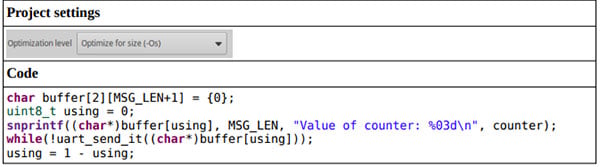

This is excellent news, since moving to sprintf also helped us improve our message rate in “Faster printf Debugging, Part 2” from 13.5k msg/sec to 16.4k msg/sec. Note that this code size reduction includes the extra instructions (shown above) that are used to double-buffer the messages being sent to the UART peripheral.
Here's a fun programming challenge: "Write a function that copies a string from one location to another, replacing every instance of '%u' with the string-representation of the next unsigned 32-bit integer in the parameter list. For example:
char src[] = "Tell me, what is it you plan to do with your %u wild and precious life?";
char dest[64] = {0};
my_sprintf(dest, src, 1);
would result in dest getting 'Tell me, what is it you plan to do with your 1 wild and precious life?'."
(It can be done in only a few dozen lines of code! Check the end of this post to see my solution, which compiled into only about 180 bytes!)
Congratulations! You've just written a suuuuper minimal version of sprintf! This probably won't be sufficient for your needs (What? You want to print signed integers too?! How greedy of you.), but you get the idea. If we can find an implementation of printf/snprintf that only has the features we need or that is otherwise optimized for code size, we can reduce how much space it takes up.
A minimal implementation of printf/snprintf that actually manages to keep all of the original features is minimal printf from mpaland. Compiling our code with this printf implementation results in a code size that's...
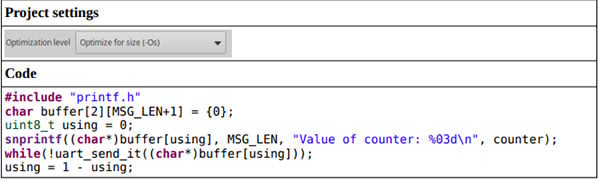

Wait, it’s bigger?! By more than 10 kB?!?! Oh, hang on! I forgot to turn off support for floating-point numbers.
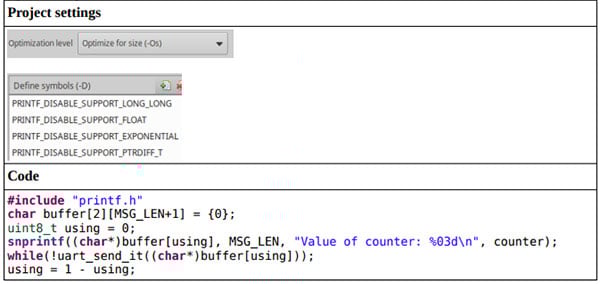

Ah, that’s better! We saved another 1.12 kB using this alternate implementation of snprintf. Of note is that this library by mpaland also does not use the heap.
But this isn’t the only implementation! Other minimal printf libraries you could try include:
This tip first showed up in “Faster printf Debugging (Part 1)” and it was used in that article to help shorten the time it took to send out our messages. But this technique has the added benefit of reducing the total amount of memory you need to store all of your messages, which helps to reduce the size of your final binary!
Taking this idea to its logical extreme (as we did in “Faster printf Debugging (Part 3)”), we could convert all of our strings into unique tokens or numbers and store just those values on our embedded system. Of the three tokenization libraries we looked at in that article (mpack, FlatBuffers, and bitproto), both Flatbuffers and bitproto were smaller than snprintf. (Note that the code below has been optimized at -O3, not -Os, to maintain consistency with the code from “Faster printf Debugging (Part 3)”.)
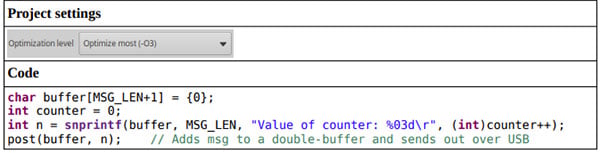

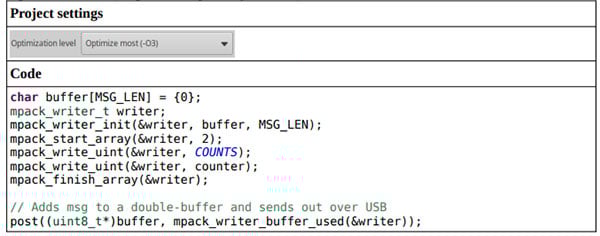

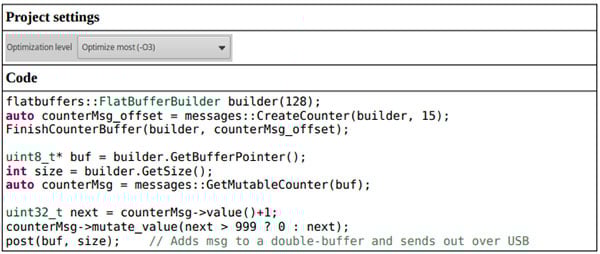
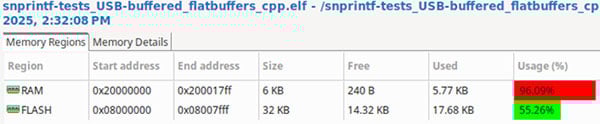
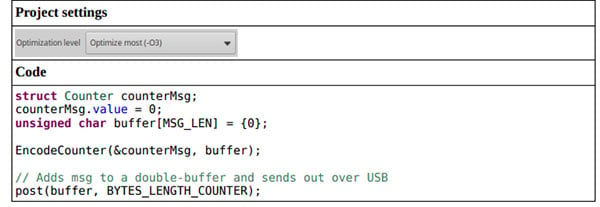
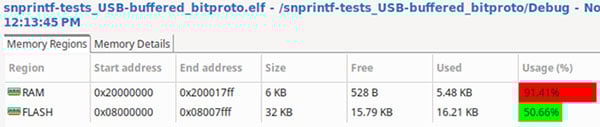
bitproto also uses about 300 bytes less RAM than the other three options above.
Keep in mind that these are all for only a single type of message with a single integer argument; each library above will almost assuredly get larger as additional messages bring in more data types (and more code to pack those new data types into a serial message). However, there will be a crossover point for these libraries (mpack and bitproto, specifically) when the total number of messages is high-enough to warrant the additional code. For instance, each mpack message only requires 1 byte of Flash (for the enum value that uniquely identifies each of the messages), as opposed to 22 bytes for each ASCII string. That would mean that a system with 350 messages or more would use 7.18 kB less Flash than the same system using sprintf, which would make up for the increase in code space.
Both mpack and FlatBuffers use the heap, but mpack has options to disable this quality, and FlatBuffers only uses the heap during the process of creating a “builder”, which possibly would only need to happen during initialization.
Segger RTT (“Real-Time Transfer”) is a form of high-speed communication which leverages the debug circuitry inside your microcontroller to transfer data to a host computer. Once configured, calling functions such as SEGGER_RTT_WriteString() cause a string to be copied to a memory buffer on the microcontroller. RTT-aware programs like Segger RTT Viewer or Ozone can then query that memory buffer by sending debug messages to the microcontroller, which happen independently from any code being executed on the microcontroller during that time.
This library hasn’t made an appearance thus far because it’s not actually smaller or faster than the other solutions we’ve looked at. At least, it wasn’t faster than those other options when I was using (effectively) an on-board J-Link debug adapter, though it could have been 20x faster had I been using a J-Link Pro or ULTRA+. My guess is that the Pro or ULTRA+ was used to make the claim above that “‘Hello world’ only takes 0.84 us to transfer”. Unfortunately, the Pro and ULTRA+ are not low-cost. Using my on-board J-Link debug adapter, RTT was about as fast and as large as using UART.
Despite that, I really like RTT! The RTT library supports some really nice features, such as:
The RTT library does not use the heap; RAM usage goes up by about 1.3 kB from our baseline implementations (i.e., the ones not using USB).
Of course, most of these size optimizations come with a trade-off in message speed (or code quality). The chart below shows how a few of our implementations differ in the areas of speed and code size.
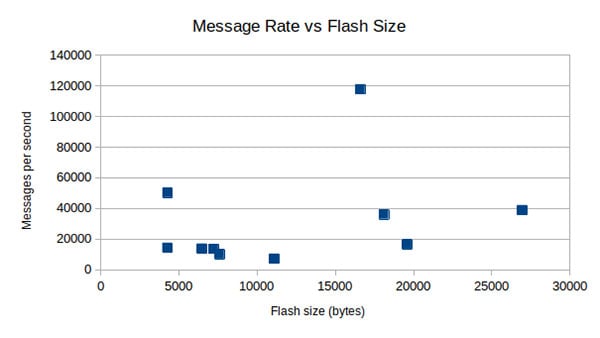
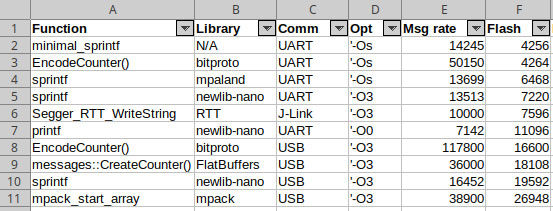
Ideally, we’d be able to find a solution in the upper-left-hand quadrant (fast and small). The only option there, though, is bitproto, which has the downside of being less portable and less backwards compatible than the other options. The next fastest options (FlatBuffers and mpack) are both over 18 kB. It’s up to you to find the best version for your application (or to experiment with additional settings or libc versions that I didn’t test!).
Although printf takes a significant 4.23 kB when first used (made that small by the fact that we were using newlib-nano, the STM32 Low-Level library, and UART; discarding unused code; and avoiding floating-point numbers), this value could be reduced
Of course, many of those smaller implementations came with trade-offs in the speed of our messages or in code quality. Complicating the issue further is the fact that additional number and types of messages will change how much Flash space is needed, possibly making certain larger solutions (e.g., mpack) more viable. There is no definitive answer for which “printf” solution is the smallest, since it depends on your specific project (nor, even, which version has the best balance of speed and size), so you’ll need to experiment yourself to determine which one is right for you.
If you’ve made it this far, thanks for reading and happy hacking!
#include <stdint.h>     // For uint8_t, uint32_t
#include <stddef.h>     // For size_t
#include <stdarg.h>     // For variadic functions

void minimal_utoa(char ** dest, uint32_t x)
{
  // UINT32_MAX is 4.3e9, so start by checking the billions place
  //
  for(uint32_t powerOf10 = 1e9; powerOf10 > 0; powerOf10 /= 10)
  {
    if(x > powerOf10)
    {

      // Get most-significant digit (“x/powerOf10”)
      //
      uint8_t dig = x/powerOf10;

      // Simple conversion to ASCII number by adding 0x30
      //
      *(*dest)++ = (char)(0x30 + dig);

      // Remove most-significant digit
      //
      x -= dig * powerOf10;
    }
  }
}

size_t minimal_sprintf(char * dest, char * fmt, ...)
{
  va_list args;
  va_start(args, fmt);

  char * start = dest;

  // Iterate over the whole string
  //
  while(*fmt != '\0')
  {
    if((*fmt == '%') && (*(fmt+1) == 'u'))
    {

      // Type specifier found! Emit decimal digits.
      //
      minimal_utoa(&dest, va_arg(args, uint32_t));
      fmt += 2;
    }
    else *dest++ = *fmt++;
  }

  va_end(args);
  return (size_t)(dest-start);
}