設定
設定
 迅速な配送
迅速な配送
 送料は無料
送料は無料
 Incoterms
 お支払い方法


 マーケットプレイス製品

メーカー品番 SC1631
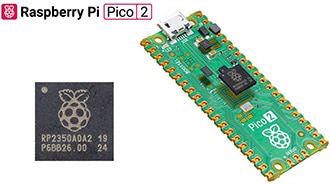
RASPBERRY PI PICO 2 RP2350
Raspberry Pi

Microcontrollers Raspberry Pi MCU
Rust is a modern programming language designed with two main goals in mind: safety and performance. Like C and C++, it gives developers fine-grained control over memory and hardware, making it a “systems programming language” (a language designed for building fundamental software that applications run on, such as operating system kernels, device drivers, and embedded firmware). Unlike many older languages, Rust was built from the ground up to prevent common pitfalls like memory leaks, dangling pointers, and data races. Instead of relying on a garbage collector (as languages like Java or Python do), Rust enforces strict rules around memory ownership at compile time. This unique model provides the low-level control needed for embedded systems while also reducing the risk of hard-to-debug runtime errors.
Rust’s origins go back to 2006, when Mozilla engineer Graydon Hoare began developing it as a side project. Inspired by the frustrations of dealing with software crashes caused by memory bugs, Hoare set out to design a language that could eliminate entire classes of errors without sacrificing speed. Mozilla quickly saw the potential and began sponsoring development, assigning engineers to the project full-time. Over the next decade, Rust matured from an experimental language with a garbage collector to a systems language powered by its unique ownership model.
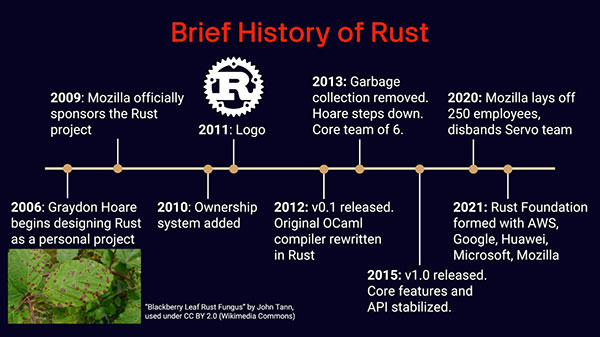
In 2015, the Rust team released version 1.0, which stabilized the language and promised long-term backward compatibility. Despite concerns after Mozilla’s restructuring in 2020, Rust continued to grow, culminating in the creation of the Rust Foundation in 2021. Backed by industry leaders like Microsoft, Google, Amazon, and Huawei, the foundation ensures the language’s sustainability and ongoing development. Today, Rust is not only used in research and hobby projects but is also being adopted in production environments ranging from web servers and operating systems to embedded devices and cloud infrastructure.
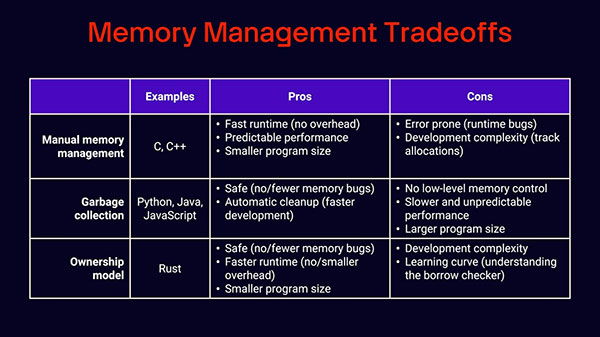
Most programming languages fall into one of two camps when it comes to memory management. At one end is manual memory management, found in languages like C and C++. Here, the programmer is responsible for explicitly allocating and freeing memory. The upside is that this approach gives you complete control, often resulting in small, fast programs with highly predictable performance (why it remains the standard in embedded systems). The downside is that it’s easy to make mistakes, leading to bugs like memory leaks, dangling pointers, or undefined behavior that can be difficult to debug or even create security vulnerabilities.
On the other end is garbage collection, used by languages like Python, Java, and JavaScript. A garbage collector automatically cleans up unused memory in the background, freeing developers from worrying about allocation details. This makes development faster and less error-prone, but comes at the cost of higher runtime overhead, larger binaries, and unpredictable pauses whenever the collector runs, which is often a deal-breaker for low-level, real-time work.
Rust introduces a third approach: the ownership model. Instead of leaving memory management to the programmer or a runtime system, Rust enforces rules at compile time about which parts of your code “own” which pieces of memory. The compiler ensures safe allocation, freeing, and borrowing of memory before your code ever runs. This approach balances the safety of garbage collection with the performance of manual management, though it does come with a steeper learning curve and sometimes longer compile times.
Rust has 3 basic ownership rules (we’ll flesh these out more in a future tutorial):
For example, let’s look at this Rust snippet:
let s1 = String::from("hello");
let s2 = s1;
// println!("{}", s1);
println!("{}", s2);
Here, the String “hello” is said to be “owned” by s1 initially. In the second line, ownership is transferred to s2. If you were to try to print the contents of s1 (given by the commented-out line), the compiler would throw an error, as s1 no longer owns the string. However, you can still print the contents of s2, as it owns the string.
Let’s look at a function example to illustrate the third rule:
fn say_hello() {
    let s1 = String::from("hello");
    let s2 = s1;
    println!("{}", s2);
}
Here, s2 goes out of scope, as it was declared as a local variable inside the function. According to the third ownership rule, the string data is immediately dropped (i.e., the memory is freed) after that println!() macro (the ‘!’ denotes a macro as opposed to a full function), as s2 goes out of scope and is no longer used after that point.
One of Rust’s biggest strengths is that it combines the low-level control of C and C++ with modern safety guarantees. Like those older systems languages, Rust allows for manual-style memory management through its ownership model, giving developers precise control without the risk of leaks or undefined behavior. It also enables direct hardware access, making it well-suited for embedded systems and operating system kernels.
Rust also boasts “zero-cost abstractions,” which means you can write expressive, high-level code without paying a performance penalty, since the compiler optimizes it down to machine code that runs as efficiently as a hand-written low-level implementation.
The lack of garbage collection ensures predictable performance, which is critical for real-time applications, while support for inline assembly means you can drop down to the CPU’s native instructions when maximum optimization or specialized hardware control is required. Together, these features make Rust a compelling choice for performance-critical and resource-constrained environments.
While Rust offers significant advantages to writing low-level code, it’s not without some challenges and limitations. The first hurdle many developers encounter is its steep learning curve. Rust enforces strict rules around ownership and borrowing, which can make even simple programs difficult to write at first. The compiler ensures strict memory safety, which means you’ll often spend time resolving compile-time errors before your code will even run. For developers used to more forgiving languages, this can feel frustrating. On top of that, Rust’s compile times are often longer than in C or C++, due to the borrow checker’s extra analysis, monomorphization of generic code, and trait resolution. This can slow down the edit-compile-debug loop, which is especially noticeable in large projects.
Rust also tends to produce larger binaries compared to C. This is partly because Rust statically links dependencies by default and because generics expand into multiple copies of code. This can be an issue for desktop applications where dynamically linked libraries (e.g., .so and .dll files) help keep binary files down. That being said, many microcontroller applications assume static linking anyway to create a single binary to be loaded onto the target.
Another drawback is that Rust currently lacks a stable application binary interface (ABI), which is the low-level specification that defines how compiled code components (e.g., functions, data structures, system calls) interact at the machine level, ensuring compatibility between programs and libraries on the same platform. The lack of a stable ABI makes it harder to interoperate directly with libraries in other languages. Most cross-language projects work around this by providing a C-compatible interface, but that adds friction and can limit ecosystem growth.
For embedded systems, the ecosystem is still immature compared to C and C++. Board support packages and driver libraries are often community-maintained rather than vendor-supported, which means APIs can change unexpectedly, and some functionality is missing. Complex peripherals like Wi-Fi, graphics, or TCP/IP stacks are still evolving, and there’s no widely adopted real-time operating system (RTOS) written in Rust. Frameworks like Embassy and RTIC are promising, but not as mature as FreeRTOS or VxWorks. Finally, a smaller knowledge base and community (compared to, e.g., embedded C) make it harder to get started with and troubleshoot embedded Rust projects.
Note that standards like MISRA C and ISO/IEC TS 17961 provide a set of coding guidelines designed to avoid unsafe language features and common pitfalls that lead to memory bugs. When rigorously followed and enforced through reviews or automated tools, they can significantly improve memory safety in C and C++ projects, though the responsibility ultimately lies with developers and teams rather than the compiler.
To keep things consistent across operating systems, this series uses a pre-configured Docker image with Rust and the necessary tools already installed. If you don’t have Docker Desktop yet, download it from docker.com and follow the installation instructions for your platform. Once Docker is installed and running, grab the project files from this GitHub repository. You can either clone the repo or download and unzip it.
Open a terminal in the project directory and build the Docker image:
cd introduction-to-embedded-rust
docker build -t env-embedded-rust .
Then launch the container with:
docker run --rm -it -p 3000:3000 \
  -v "$(pwd)/workspace:/home/student/workspace" \
  -w /workspace env-embedded-rust
This command maps your workspace/ folder so you can edit files on your host machine while compiling inside the container. If you’re using VS Code, install the Dev Containers extension, open the project folder, and choose Reopen in Container to work seamlessly inside the environment.
Once inside the container, create a simple Rust app. Start by creating a directory structure as follows:
hello-world/
├── Cargo.toml
└── src/
    └── main.rs
In hello-world/src/main.rs, add the following code:
fn main() {
    println!("Hello, world!");
}
To compile and run it directly with the Rust compiler, use:
rustc main.rs
./main
You should see the familiar output:
Hello, world!
While rustc works for quick tests, most Rust projects rely on Cargo, Rust’s package manager and build tool. From the hello-world/ directory, create a Cargo.toml file with a minimal package definition:
name = "hello"
version = "0.1.0"
edition = "2024"
From the hello-world/ directory, build and run your program with:
cargo build
cargo run
Cargo takes care of compiling your code, linking dependencies, and managing build artifacts. You’ve just created and run your first Rust program inside a reproducible Docker environment! We’ll build on this in the coming episodes to create a variety of embedded Rust applications.
In the next episode, we will create our first embedded Rust application for the Raspberry Pi Pico 2. Before then, I highly recommend reading chapters 1-3 in the Rust Book. I also recommend doing the variables, functions, and if sections in rustlings to test your knowledge from the book.
Find the full Intro to Embedded Rust series here.